
AI Services

Protected Tools for Secure Innovation
Texas A&M University provides access to protected versions of many AI services. When accessed with your NetID and password, campus members can confidently utilize these AI resources, knowing they comply with university data protection policies and contractual agreements, ensuring your data remains private and is not used for external model training.
Compare AI Services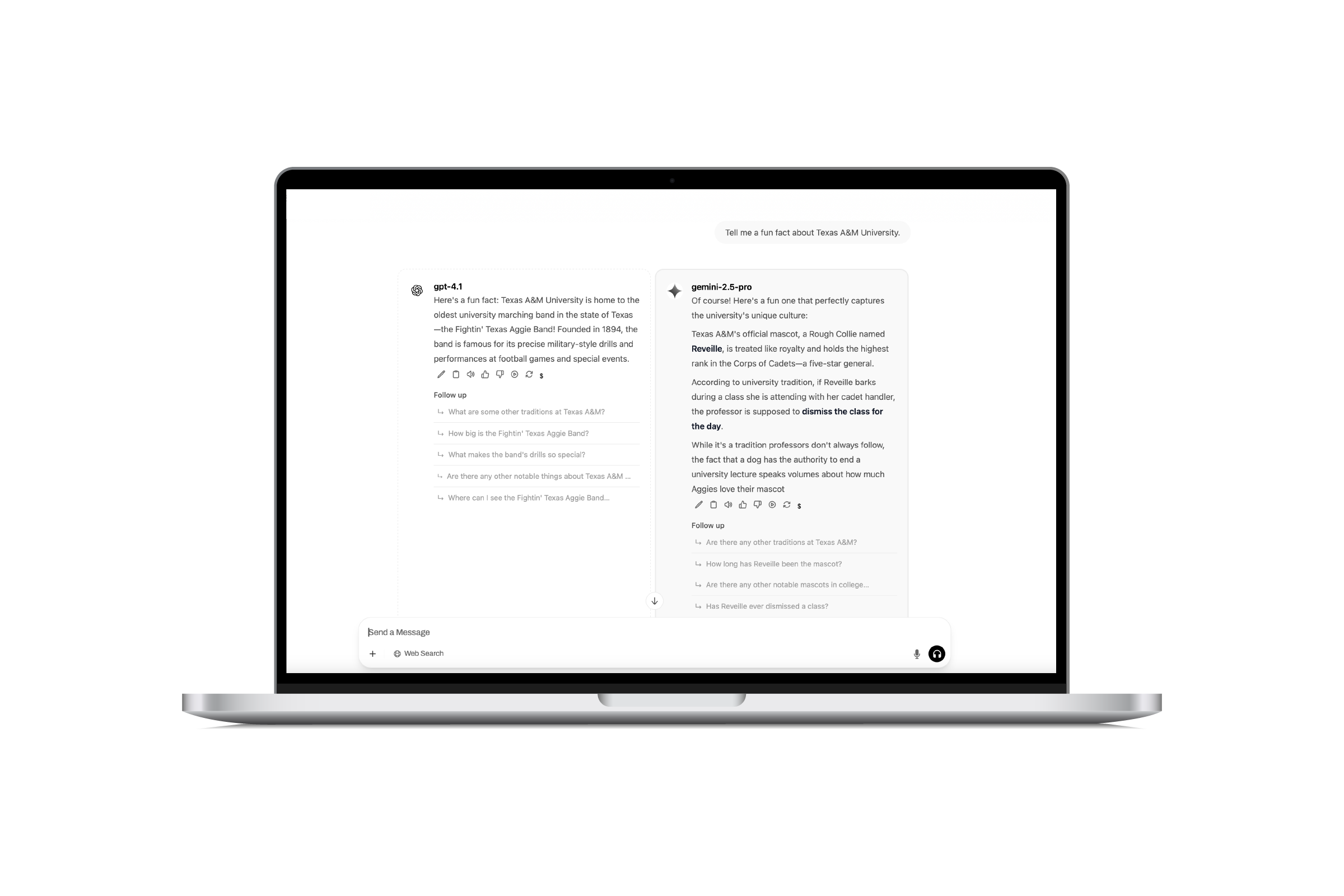
TAMU AI Chat
Open to all Texas A&M students and employees, TAMU AI Chat (currently in BETA) provides staff, faculty, researchers, and students with a secure, university-approved platform to access multiple AI tools like OpenAI's GPT, Anthropic's Claude Sonnet, and Google's Gemini.
Log in to TAMU AI ChatMultiple Models in One Place
TAMU AI Chat gives you access to many commercial AI models and allows you to run prompts against multiple models at the same time. TAMU AI Chat supports content classified as University-Confidential or lower.
Usage Limits
All campus members receive a daily usage limit, which resets at midnight UTC (between 6–7 p.m. Central Time). Usage depends on the AI models used and the complexity of the prompt. Learn more about daily usage limits.
Free AI Tools
Free AI tools provided by the University to all students, faculty, and staff.
Google and Microsoft tools are approved for data classified as University-Confidential or lower, and should not be used with export-controlled data, government ID numbers, or financial records.

Microsoft 365 Copilot Chat
Microsoft 365 (M365) Copilot Chat with data protection is a secure AI chatbot that ensures privacy by not using your conversations for model training or sharing data with OpenAI.
Learn more about Copilot Chat and data restrictions
Log in to Copilot Chat
Google Gemini
Google Gemini with data protection is an AI chatbot designed around search and supports more natural language queries. When logged in with your Texas A&M account, the data protection is activated.
Learn more about Gemini and data restrictions
Log in to Gemini
Gemini Notebook
Gemini Notebook is an AI-powered tool that helps you research, write and organize information. To ensure data is protected, you must log in with your NetID and password.
Learn more about Gemini Notebook and data restrictions
Log in to Gemini NotebookSubscription-Based AI Tools
AI tools available for purchase by faculty and staff.
Google and Microsoft tools are approved for data classified as University-Confidential or lower, and should not be used with export-controlled data, government ID numbers, or financial records.
Microsoft 365 Copilot
Microsoft 365 Copilot is an AI assistant integrated into M365 apps like Word, Excel, PowerPoint, Outlook, and Teams.
Purchase Copilot
Microsoft Teams Premium
Microsoft Teams Premium is an add-on subscription with advanced features focused on intelligence, personalization, and security.
Purchase Teams Premium
Google AI Pro
Google AI Pro is an add-on subscription with advanced AI models to handle longer documents, track more details and offer advanced reasoning.
Purchase Google AI ProCompare AI Services
The AI Services Matrix provides a comprehensive overview of the AI services available to campus members. Take a closer look at which tool is right for you.
Compare AI ServicesAI-Enabled Development
Availability
Available to Texas A&M employees. Employees can request accounts for students if needed. Requires funding via a FAMIS account or internal TAMU PO.
Pricing
Pay only for what you use. Costs are based on actual usage and are billed through FAMIS accounts or internal TAMU invoices.
Data Protection
Development Platforms and Hubs are approved for data classified as University Confidential or lower.
Get Started
Contact Technology Services if you would like to use an AI Development Platform or Development Hub.
Development Platforms
Development Platforms allow you to build, train, and launch AI apps using powerful, ready-to-use models from leading providers such as Anthropic, Meta, Cohere and Amazon Titan—without needing to start from scratch. Just bring your data and your ideas.
Best For: Platforms use general-purpose AI engines for a wide range of tasks—from answering questions and generating content to creating chatbots and analyzing large, complex datasets.
- Amazon Bedrock - (models from Anthropic, Meta, Cohere and Amazon Titan)
- Microsoft Azure AI Services - (Azure OpenAI and Cognitive Services)
- Google Vertex AI - (Google's machine learning infrastructure)
Development Hubs
Development Hubs are technical environments that offer a more comprehensive toolset for customizing, testing and implementing generative AI models. Hubs allow you to connect multiple platforms.
Best For: Hubs allow you to customize and refine AI models extensively to meet your needs —all with minimal coding. Ideal for quickly prototyping and testing new ideas.
- Amazon Bedrock Studio - Experiment with various AI models, tailor their behavior, and build apps. Quickly prototype and test new ideas.
- Microsoft Azure AI Foundry - Collaborative environment for customizing AI models to meet specific goals. Conduct academic research, foster departmental innovation, and develop scalable AI solutions.
- Microsoft Copilot Studio - Create custom AI assistants like chatbots or virtual helpers. Automate tasks and build smart tools to support teaching, research, and campus operations.
- Google AI and Vertex Studio - Explore and customize Google's AI models with an easy-to-use interface. Test ideas and build smart tools to support research, teaching and campus services. Learn how to set up and request a Google AI Studio.
AI Services Under Review
Technology Services is currently developing or reviewing AI-enabled tools for security, usability, cost, and contract details.
| Product Name | Description |
|---|---|
| GitHub Copilot | Under review |
| Zoom AI Companion | Under review by the Office of the Provost |
Prohibited AI Technology
Texas A&M University prohibits certain technologies and applications on state-owned devices and networks, and restricts their use on personal devices used for state business.
Learn more about prohibited AI technology